


NetFic
4.874.00 Reviews
App Specs
- Version
- 1.9.6
- Updated On
- License
- Free
- Downloads
- 10,000+
- Developer
- BookTop Team
- Categories
- Books & Reference
- Platform
- Android
Screenshots




 Analysis by AppCompare
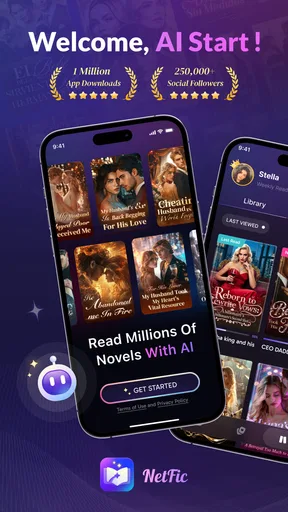
I approached NetFic as a reading app rather than as a quick sample of popular titles, and that distinction matters. It belongs to the Books & Reference category, but its appeal is much closer to a serialized fiction platform: the catalog focuses on dramatic themes such as billionaires, pregnancy, werewolves, demon hunters, and other high-emotion stories. I found it most enjoyable when I treated each story as an ongoing reading habit instead of expecting the experience of a conventional ebook reader.
The app is free to install, which makes it easy to try without committing money at the beginning. At the same time, in-app purchases range from $1.99 to $99.99 per item, so the real cost depends on how you read and whether you decide to buy anything. That is the first practical point I would give a friend: browse first, understand the reading flow, and only then decide whether paid extras fit your habits.
Getting past the first points of friction
I find the first hurdle is figuring out whether a slow start comes from the story, the reading flow, or the phone—not trying to fix everything at once. In this section, I’d focus on a calm first check: choose one title, give it a little time, and notice where the friction actually appears. That makes it easier to approach a stalled session without losing track of what you already tried.
Why the opening experience can feel less straightforward
The biggest adjustment is knowing what kind of app you are opening. Someone looking for public-domain books, reference material, or a simple bookshelf may find the emphasis on romance, fantasy, supernatural conflict, and dramatic twists narrower than expected. NetFic is designed around escapist serialized fiction, so the right question is not “Does it contain every kind of book?” but “Do these story themes match what I want to read?”
I would also pay attention to the Mature 17+ content rating before handing the phone to a younger reader. That rating is an important part of deciding whether the app belongs on a shared family device. Even if a particular story feels mild at first, the overall catalog is aimed at mature readers, and the themes named by the app already signal intense relationships, adult situations, and supernatural danger.
The app comes from BookTop Team and has built a strong public reception, with a 4.8 average from around 1.3K ratings. I see that as encouraging evidence that its intended audience finds the reading experience worthwhile, not as a guarantee that every title will suit every reader. Serialized fiction is especially personal: one reader may enjoy a slow-burn romance, while another may abandon it after a few chapters.
What I would check before judging the reading experience
My first setup check would be the device itself. NetFic supports Android 7.0 and later, so an older phone may technically meet the requirement but still deliver a less comfortable experience if storage is tight, the operating system is outdated in other ways, or many apps are competing for memory. I would close unused apps, make sure the system has room to work, and restart the phone before assuming the reader is malfunctioning.
Worth Reading Before You Choose

Flipboard Shows What News Apps Must Do Beyond the Feed

Switching to Android Auto Means Rethinking Your Driving Routine

Google Calendar Makes a Crowded Week Easier to Manage

Ludo King Makes the Most of the Minutes Between Plans

Baby Panda World Brings Quick Play to Modern Phones, but Its Game Library Feels Busy

ESPN’s Live Game View Makes Following Close Games Easier
Next, I would test the connection in the place where I normally read. A story app can appear unreliable when the real problem is an unstable mobile signal or a Wi-Fi network that drops briefly. If a chapter takes a long time to appear, I would switch between Wi-Fi and mobile data once, then retry. That simple comparison tells me whether the issue follows the app or the network.
Because the current version is 1.9.6, I would also check whether the installed version matches the latest version offered through the official app store. Updating is a sensible first step when pages load oddly or the interface behaves inconsistently. I would avoid downloading modified packages from unofficial sources: with a reading app that may involve accounts or purchases, the safest troubleshooting path is the normal store installation.
A sensible first-reading routine
Rather than opening several stories at once, I recommend choosing one title that clearly matches your preferred theme and reading enough to decide whether the writing style works for you. This is a useful way to avoid confusing catalog discovery with app quality. If you start five unrelated stories, it becomes difficult to tell whether you dislike NetFic or simply picked the wrong stories.
I would keep a small mental distinction between three things: finding a story, continuing a story, and paying for access. Those are separate decisions. A title can be easy to discover but not worth continuing; another can become a favorite only after a slower opening. Similarly, seeing a purchase option does not mean you need to buy immediately. I found that this pause makes the free-to-try model feel much more manageable.
One practical habit is to read when the phone is comfortably charged and the connection is stable, especially if I am settling in for a longer session. This sounds ordinary, but it prevents a frustrating interruption from being mistaken for a problem with the story or the app. If the reading session ends unexpectedly, I first reopen the same title before switching to another one, because that helps identify whether the issue is isolated.
Recovering a reading session when something goes wrong
When a reading session breaks, I prefer to preserve clues before making changes: note the story and chapter, then reopen the same title and see whether the problem repeats. This section looks at ways to regain your place while avoiding rushed taps or actions that could complicate a purchase. Once the reading issue is isolated, it’s easier to judge whether the app itself is responsible.
When a chapter does not open or progress seems stuck
If a chapter appears stuck, I would start with the least disruptive fix: wait briefly, return to the previous screen, and open the chapter again. I would not immediately clear all app data, because that can remove local session information and create a second problem. A force close and restart is a better next step, followed by checking the connection.
If several titles show the same behavior, I would treat that as a broader loading issue rather than a problem with one story. Testing another network, restarting the device, and confirming that the app is current are reasonable general checks. If only one title is affected while other parts of the catalog work, I would record the title and chapter before contacting support through the appropriate official channel. Specific details are more useful than a vague report that “the app is broken.”
Keeping track of reading without creating confusion
Serialized reading can become messy when I jump rapidly between stories. My practical workaround is to keep one primary story and one backup story, rather than opening every appealing cover. If progress appears to have reset, I first return to the same title and look for the most recent chapter I remember reading. I would also avoid repeatedly tapping purchase or unlock controls while a page is still loading, since repeated taps can make it unclear whether an action was processed.
This is also where a deliberate reading routine helps. I make a note of the story title and the last chapter I finished, particularly before changing devices or reinstalling anything. That is not a substitute for account synchronization if the app provides it, but it gives me a reliable reference point when I need to recover my place. It is a small habit that is more useful than relying on memory after reading several dramatic cliffhangers.
Handling purchases with care
The free entry point is one of NetFic’s strongest advantages, but the purchase range deserves attention. Items can cost from $1.99 to $99.99, which is a wide gap. I would never treat the first low-priced option as an indication of the total amount I might spend on a long-running reading habit. Before confirming a purchase, I would check the exact item, review the store confirmation screen, and decide whether I am paying for a single immediate need or beginning a pattern of spending.
If a purchase appears not to unlock the expected reading access, I would avoid buying the same item again. I would first confirm that the transaction completed through the platform’s normal purchase record, then restart the app and check the original story. If the issue remains, I would keep the receipt or transaction information and use the official support route. This approach is safer than repeated tapping and reduces the chance of duplicate charges.
I also think the app is better suited to readers who can set a personal spending limit than to anyone who wants a completely predictable reading budget. A traditional library app or a subscription service with a clearly defined monthly price may be a better fit for readers who dislike chapter-based decisions or variable purchases. NetFic’s model is more appealing when the ability to sample freely matters more than having one fixed cost.
Separating app trouble from phone and network trouble
I don’t assume every loading delay is an app fault; the same symptom can come from a weak connection, limited device space, or a wider phone slowdown. Here, I’d compare a couple of simple checks before reinstalling anything, so I can avoid disrupting a working setup unnecessarily. The next section helps separate those possible causes and choose a sensible next step.
Signs that the device is the real source
Not every freeze, delay, or failed refresh comes from NetFic. If other apps are also slow, the phone may be low on available storage or dealing with a wider system problem. I would restart the device, check free space, and see whether the issue appears in another app that uses an internet connection. If everything else is struggling, reinstalling the reading app alone is unlikely to solve the root cause.
Battery-saving settings can also affect how an app behaves in the background, although I would change those settings carefully and only when the problem clearly involves returning to an open session. I would not disable broad security protections or install tools that promise to “repair” the app. For a reading platform, ordinary checks are usually the sensible ones: current software, stable connectivity, enough storage, and a clean restart.
When network conditions imitate a catalog problem
A weak connection can make a story list look incomplete or make a chapter seem unavailable. I would compare behavior on a reliable Wi-Fi connection and on mobile data, if available, without assuming that one successful attempt proves the problem is fixed. Public networks can also interfere with normal loading, so I would test again later on a trusted connection before changing settings unnecessarily.
If the app opens normally but one specific page refuses to load, I would not immediately blame my phone. I would retry later, note whether other chapters work, and report the exact behavior if it continues. That distinction is useful because a title-specific issue needs a different response from a device-wide failure. It also prevents the common mistake of deleting and reinstalling an app when the problem may be temporary or limited to one piece of content.
Who will appreciate NetFic most
I would recommend it to readers who enjoy dramatic hooks, romantic tension, supernatural worlds, and stories built around continuing episodes. The themes highlighted by the app give a clear sense of its personality. If you like moving between billionaire fiction and werewolf or demon-hunter stories depending on your mood, the focused catalog is likely to feel more useful than a general ebook reader filled with unrelated material.
It also suits readers who want to try a story before spending money. The free installation lowers the barrier to entry, and the public response suggests that many readers find enough value to rate it highly. I would particularly suggest it to someone who reads in short bursts: during a commute, while waiting for an appointment, or before bed, provided the mature rating and dramatic style are appropriate.
Who should choose something else
I would skip NetFic if my main goal were reference books, serious nonfiction, academic reading, or a broad collection of conventional ebooks. The app’s identity is too focused on serialized entertainment for those needs. A library service may be better for readers who want borrowing rather than purchases, while a standard ebook reader may be preferable for people who already own files and want a quiet, format-first experience.
I would also hesitate to recommend it to anyone who dislikes cliffhangers or feels pressured by optional purchases. Serialized fiction often depends on momentum, and NetFic’s themes are built for heightened drama rather than restrained storytelling. If I want to finish a complete novel in one uninterrupted purchase, I would choose a conventional ebook store instead of adapting to a chapter-by-chapter reading routine.
My practical verdict after using it
NetFic works best when I approach it on its own terms: a mature fiction app for readers who enjoy emotionally intense, theme-driven stories and do not mind an ongoing reading format. BookTop Team has created something more specific than a generic digital bookshelf, and that focus is both its main strength and its main limitation. It helps the right reader find familiar types of stories quickly, but it will not satisfy someone searching for every kind of book in one place.
The setup is not difficult, yet a few habits make the experience noticeably smoother. I would confirm Android compatibility, update to the current version, test the connection, start with one story, and avoid making purchase decisions while a page is still loading. If a problem appears, I would restart before reinstalling, compare networks, and distinguish a single-title issue from a phone-wide issue. These steps are simple, but they prevent most avoidable frustration.
The app has reached over 10K installs, and its 4.8 average shows that its target audience is responding positively. I would read those figures as a reason to try it, not as a promise that every story will land. My own recommendation is conditional but clear: if the billionaire, pregnancy, werewolf, and demon-hunter themes sound like the kind of dramatic escape you already seek, the free starting point makes NetFic worth exploring. If you want predictable pricing, completed books, or a broad reference library, another reading option will probably serve you better.
For me, the deciding factor is control. I want to choose the story, understand how purchases work, and know what to do when loading fails. NetFic is enjoyable when I keep those boundaries in place. Try the free reading experience first, protect your spending limit, and judge the app by the stories that genuinely hold your attention.
Pros
- Large selection of serialized fiction and short stories
- Personalized recommendations make new titles easy to discover
- Offline reading is useful when traveling or without stable internet
- Regular updates keep ongoing stories fresh and engaging
- Simple interface makes browsing and reading comfortable
Cons
- Some stories may end abruptly or remain unfinished
- Premium chapters can become expensive over long series
- Ad interruptions may affect the free reading experience
- Story quality varies considerably between different authors
- Offline access may be limited to selected content
FAQs for NetFic
What is NetFic and what can I use it for?
NetFic is an entertainment app focused on reading or discovering fiction content, such as serialized stories, novels, or fan-created works, depending on the version available in your region. After installing it, users can browse titles, open story descriptions, follow ongoing publications, and read available chapters. The exact catalog and features may vary by country, platform, and app updates.
Is NetFic free to download and use?
NetFic can generally be downloaded without an upfront charge, but free access does not necessarily mean that every story or feature is completely free. Some content may be supported by advertisements, limited daily access, virtual credits, subscriptions, or individual purchases. Before reading extensively, check the in-app pricing information and payment terms so you understand which chapters or tools may require spending money.
Does NetFic require an account or an internet connection?
An account may be optional for basic browsing, but signing in is usually useful if you want to save reading progress, create a personal library, synchronize activity between devices, or receive recommendations. An internet connection is normally required to load the catalog and stream or download chapters. If offline reading is supported, chapters generally need to be saved in advance and may remain subject to app restrictions.
Is NetFic suitable for children and teenagers?
The suitability of NetFic depends on the stories available in its catalog. Fiction platforms may include romance, mature themes, violence, strong language, or other content intended for older readers. Parents should review the app-store age rating, the platform’s content labels, and the privacy settings before allowing a child to use it. Do not assume that every title follows the same age-appropriate standards.
What should I check before downloading NetFic?
Before downloading NetFic, review the latest store listing, supported Android or iOS version, developer information, privacy policy, and permissions requested by the app. It is also worth checking whether the service is available in your country, whether purchases are refundable under the applicable store rules, and whether advertisements or subscriptions are involved. Downloading only from the official Google Play Store or Apple App Store is recommended for safety.


